
物々交換でメインマウスを生贄に、M5を入手‼️‼️フィンガーチップ強化期間開始 Bluetoothもいけるしちっちゃいしで持ち運びやすくていいね


This article summarizes events that occurred before this website was established (actual date: February 2026).
Around autumn 2025, I decided to switch back to a fingertip grip style. Accordingly, I also changed my main mouse to one suited for fingertip use.
At the time I was using the Darmoshark M5.
物々交換でメインマウスを生贄に、M5を入手‼️‼️フィンガーチップ強化期間開始 Bluetoothもいけるしちっちゃいしで持ち運びやすくていいね
However, I was frustrated with the inconvenience of wireless, the latency, and the shape. What I was looking for was a wired mouse with reasonably modern sensor performance, a fingertip-friendly shape, and pinched side indentations on both flanks. No such mouse exists on the market. So I borrowed 3D print files from an open-source project and built one myself.
The 3D-printed mouse I ultimately landed on is this one.
/https://fbi.cults3d.com/uploaders/24498606/illustration-file/7bf0168f-45df-4944-91c2-d62ac650e68a/Desenvo-2.jpg)
This is the HCO-OP18K shape mod based on cut OP1 Shape , with the internal components of the OP1 8K. All information and pictures are on Notion :) https://haunterwell.notion.site/Harpia-Lab-7adb094071c448b3ab0b391147ea4a9a By purchasing you agree to the following: All purchased .stl model files (File) are exclusively reserved for your personal/private use only. You will not share, distribute, rent and sell the File or items resulting from the File in any way. You will not share, distribute, rent and sell any modification, adaptation and copy of the File for economic or financial gain. You will not include this File as part of another 3D model or file, unless the original author/designer of the File has given you their written approval.
This is the HCO-OP18K shape mod based on cut OP1 Shape, with the internal components of the OP1 8K.
As stated, the shape is essentially the OP1 with its rear section cut off. The creator is HaunterWell, who I believe is (or was) involved with PMM/WestLab and the former Harpia Lab. Beyond this shape, they have released data for a wide variety of other MOD mice as well.

One of my frustrations with the Darmoshark M5 was that it was a wireless mouse. Having to charge it, dealing with slight latency — wireless mice inevitably come with their inconveniences. Regarding latency, as pingu noted in their video, it is genuinely minuscule and has only been reported by a subset of users, but it appears to be specific to the Darmoshark firmware.
When I previously used the OP1 8K, I was satisfied with its performance and didn’t mind the wired connection at all. The reason I stopped using it was simply that the symmetrical shape didn’t suit my claw grip at the time.
Also, for a rather personal reason, the fact that the OP1 8K uses mechanical switches is a significant advantage for me. I dislike the click sounds of both mice and keyboards, so I often perform silencing modifications before using them. I plan to write an article on that topic as well.
As mentioned in that article, I have not yet managed a satisfactory silencing mod for the optical mouse switches that are now mainstream. For that reason, I was looking for mice that use mechanical switches, or that support both optical and mechanical switches.

31 g with grip tape and everything attached. It’s a 3D-printed mouse, so being fairly light is only natural.
Some might wonder whether lighter is always better, or whether a mouse can actually be too light — but my view is that lighter is always better. A lighter mouse means less effort to start moving, and less effort during tracking as well. You might think it would be harder to stop precisely, but that just means training yourself to stop it with your own muscles. It’s simply a matter of learning to arrest the motion that you previously relied on the mouse’s weight or the mousepad to kill for you. Let’s adapt ourselves to devices that feel like “this would be powerful once I get used to it.”
Tahara-san from Artisan also said the following in the Developer Interview 2025:
I do feel that more players have started paying attention to play form and aiming technique. Many players tend to keep their settings and devices fixed, change their mousepad, and then evaluate immediately based on whether their results improved — essentially asking whether the mousepad “suits them.” I don’t dismiss that approach, but I would strongly encourage players to also try adjusting their play form and sensitivity to match the characteristics of the mousepad — to actively adapt to it. There are downsides, such as a temporary dip in performance and the time it takes for a new style to become ingrained, but it can lead to new insights and the possibility of breaking through limits that gameplay alone couldn’t overcome.
What I particularly like about the HCOOP18K’s shape are the side indentations and the flare toward the rear.
One advantage of a fingertip grip is the ability to make fine adjustments with the tips of your fingers. The sides of the Darmoshark M5 I used before were almost perfectly flat and vertical. With a flat side, there is very little finger contact when you tilt the mouse slightly, making fine adjustments difficult — even with grip tape applied. I wanted a shape that follows the contour of the fingers a bit more. My personal belief is that mouse shapes should have at least some ergonomic consideration. I think this is partly because I started out on ergonomic mice. When I searched for mice with this kind of shape, I came across the G-Wolves Fenrir Max and Asym. Both flare outward toward the rear, and the Asym in particular has a pronounced bulge on the right flank.

I found some 3D-printable shape test files floating around, printed them, and gave them a try. The Max has better overall balance, but the Asym follows the fingers more closely — especially the right-side indentation, which I felt suited a fingertip grip well. However, the thumb-side indentation remains unchanged, so the grip still felt slightly lacking there. In my search for a shape with indentations on both sides — what you might call a “wide-rear” shape like the X2H or OP1 — I eventually arrived at the HCOOP18K.

Being 3D-printed allows for a fair degree of self-customization. Since the 3D data is in my hands, I can inspect the internal structure, modify it myself, or tweak the shape and reprint. As long as I have enough material, I can print as many times as I want — so even if I ruin a part by sanding or drilling, I can simply make another one right away.
I reprinted several times to tune the click feel…
調整を重ねてクリック感神になった
Loaded multiple 3D models to check whether a cable relief designed by someone else would fit…
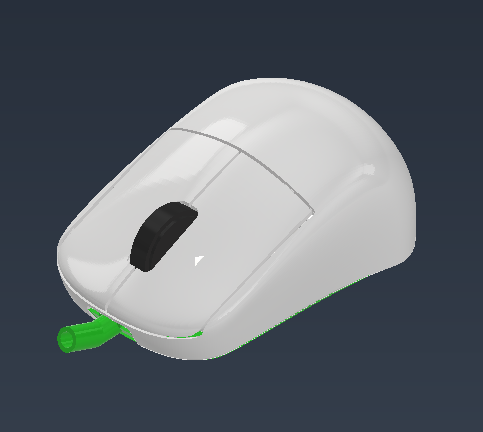
Printed multiple bottom panels so I could swap skates easily…

That was an introduction to a 3D-printed fingertip mouse MOD using the OP1 8K PCB. It is reportedly compatible with the OP1 8K v2 as well, so if you have an OP1 8K, why not give it a try?
This is the HCO-OP18K shape mod based on cut OP1 Shape , with the internal components of the OP1 8K. All information and pictures are on Notion :) https://haunterwell.notion.site/Harpia-Lab-7adb094071c448b3ab0b391147ea4a9a By purchasing you agree to the following: All purchased .stl model files (File) are exclusively reserved for your personal/private use only. You will not share, distribute, rent and sell the File or items resulting from the File in any way. You will not share, distribute, rent and sell any modification, adaptation and copy of the File for economic or financial gain. You will not include this File as part of another 3D model or file, unless the original author/designer of the File has given you their written approval.