ReLow60 Firmware v1.10 & ReConf v1.3.0: Macro Feature for Recording and Playing Back Key Actions
Overview
The ReLow60 L-HE firmware has been updated to v1.10 and the configurator ReConf to v1.3.0. This update introduces a macro feature. You can pre-record sequences of key presses, releases, and delays, then play back the entire sequence with a single key press. This lets you consolidate multiple key actions — such as typing fixed phrases or rapid shortcut sequences — into a single key.
What Macros Can Do
- Store up to 16 macros
- Each macro is built from any combination of the following steps:
- Tap: press and release a key (1 step)
- Press: hold a key down
- Release: release a held key
- Delay: wait before the next step (in 10 ms increments, up to 2550 ms)
- Bulk string insertion is supported: type a string and it is automatically converted into a sequence of tap steps (based on US layout)
- Recorded macros are played back by assigning a macro key (MC) to any key
ReConf Macro Editor (v1.3.0)
A Macro tab has been added to ReConf. Select a macro number, then add, reorder, and edit steps to build your macro.
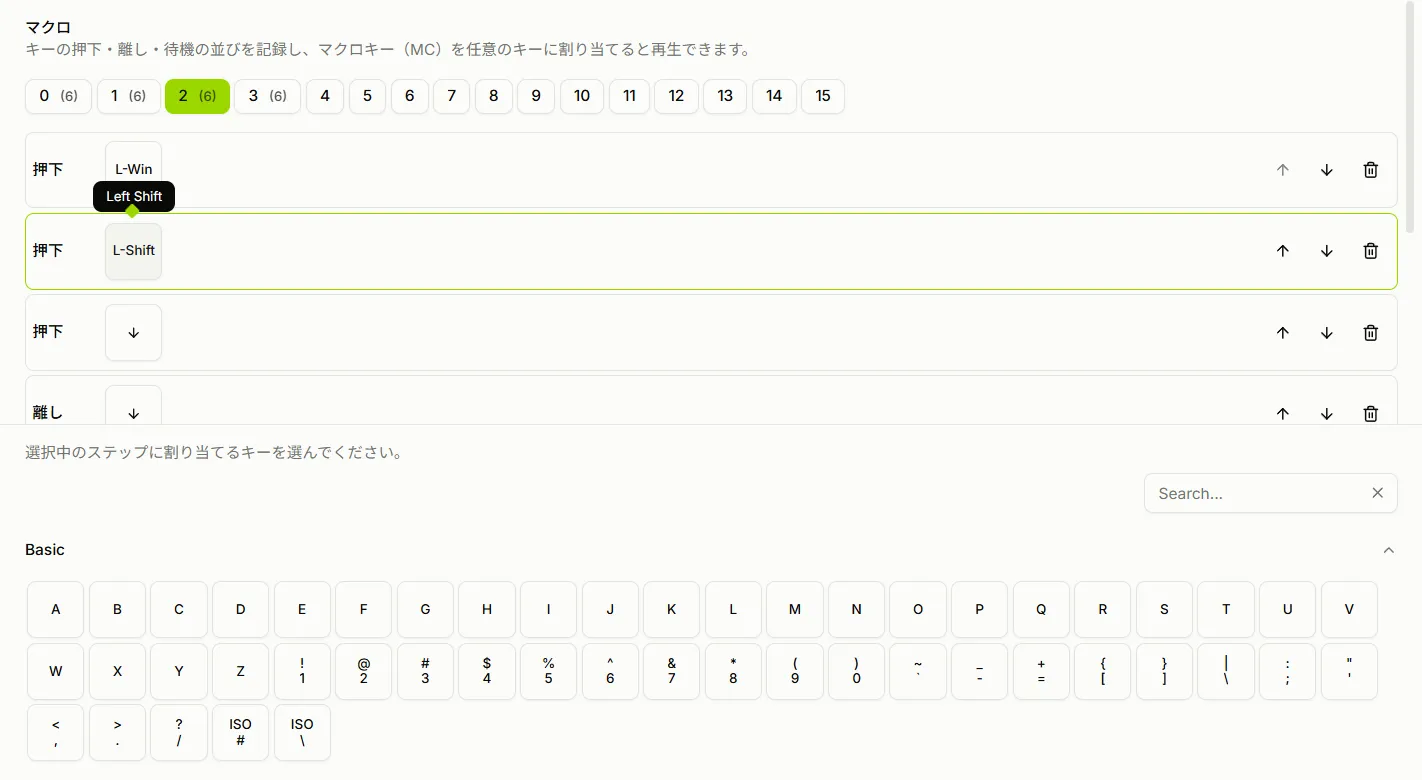
Paired Press+Release to Prevent Stuck Keys
When using keys in a macro, press (down) and release (up) steps must always be paired. If only one side is present, the key will remain held down after the macro finishes.
To address this, ReConf creates both a press and a release step as a pair whenever you add a key.
- The two steps can be freely reordered just like any other step. You can insert other keys or delays between them.
- Immediately after adding a pair, selecting either step and choosing a key applies that key to both steps (after that, each step can be edited independently).
- You can delete only one step of a pair, but if doing so would leave a key held down, a confirmation dialog will warn you.
This prevents accidents such as recording only a key press and leaving the key stuck, while still allowing intentional held-key states when needed.
Assigning Macros to Keys
Once created, assign a macro key (MC) to any key in the keymap screen. Pressing that key will play back the macro. Each macro number can be assigned to a different key.
ReLow Series Keyboard Configurator
Existing settings are preserved across updates. Flashing firmware v1.10 retains all current keymap, actuation point, Rapid Trigger, and other settings.
How to Update
Flashing is done entirely in the browser using ReConf’s firmware update feature (Web DFU). The procedure is described in a separate article.
Steps for flashing firmware from a browser via ReConf
Source Code (GPL-3.0)
The ReLow60 firmware is based on libhmk (GPL-3.0), and the corresponding source is publicly available.
ReLow60 L-HE Firmware (GPL-3.0)